Arkansas Storm Team
Nexstar Inc.Weather
4.4732.00 Reviews
- Version
- 6.2.512
- Installs
- 50.00K
- Age Rating
- Everyone
Screenshots
Our Review of Arkansas Storm Team
 Analysis by Appyee
Weather apps are easy to judge after a quick glance, but a local forecast tool earns its place on my phone through repetition: I want to know whether it helps me plan a school run, decide when to leave work, or react quickly when conditions change. Arkansas Storm Team is built around that practical need. It is a free weather app from Nexstar Inc., aimed specifically at Arkansas users who want a regional source rather than a broad national forecast with local information added as an afterthought.
After using it as an everyday weather companion, I found its biggest appeal is focus. The app is not trying to be a general news portal, a social network, or an entertainment product. Its purpose is to put Arkansas weather information within easy reach. That makes it especially useful for people who regularly deal with changing local conditions and prefer checking one familiar source instead of searching the web each time.
The app has been available since March 10, 2014, and its current release is version 6.2.512. That long presence matters because weather apps need to feel dependable over time, not merely attractive during the first few minutes. On Android, it requires OS 9 or later, carries an Everyone age rating, and is free to use. In the store, it has an average rating of 4.4 from around 2.4 thousand ratings, with more than 50 thousand installs.
How I use Arkansas Storm Team in a normal day
My baseline workflow is deliberately simple. I open the app before leaving home, check the current local conditions, look ahead at the forecast, and then return later if the day looks unsettled. This sounds obvious, but the value is in making that routine quick enough that I actually follow it. A weather app that requires too much searching gets ignored, especially during a busy morning.
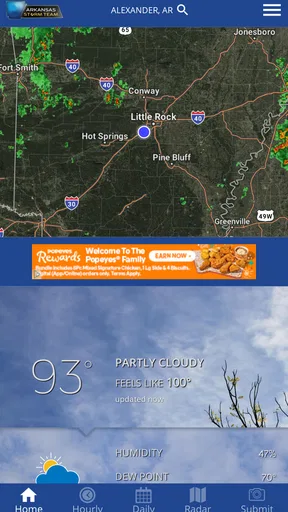
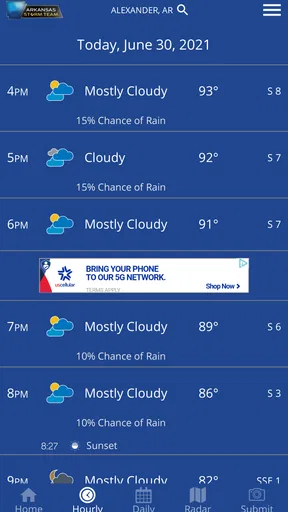
For a typical weekday, I would use it in three stages. First, I check whether the temperature and conditions match what I see outside. Second, I look at the upcoming hours rather than relying only on the day’s general label. Third, if rain or storms appear likely, I revisit the app before commuting home. That last check is important because a morning forecast can be less useful than a fresh look shortly before a planned trip.
One realistic example is a family drive across town for an afternoon appointment. I would not use the app simply to decide whether to carry an umbrella. I would check it before leaving, note whether the weather appears stable through the travel window, and check again before returning. If the conditions look uncertain, I would build in extra time instead of treating the forecast as a promise. This is where a local weather app becomes a planning tool rather than a decorative widget.
I also like separating “what is happening now” from “what might happen later.” Current conditions help with immediate choices such as clothing or whether to walk. The forecast helps with decisions that have consequences, such as outdoor work, driving, or arranging a pickup. Keeping those questions separate prevents one quick glance at the current sky from giving me false confidence about the rest of the day.
That workflow suits Arkansas Storm Team’s local identity. Someone who lives in Arkansas and checks regional weather frequently will probably get more practical value from a dedicated local app than from a generic forecast page that makes the user select a location repeatedly. The app feels most useful when it becomes part of a habit: open it at the same points in the day, compare the forecast with what actually happens, and adjust how much trust you place in different situations.
Settings I would check before relying on it
My first recommendation is to review the app’s location-related behavior and make sure the selected place represents where you actually spend time. A forecast for the wrong town can still look convincing, which makes this a more important check than many people realize. If you work in one area and live in another, choose the location that matters most for the decisions you make through the day, then check the second area manually when needed.
I would also inspect notification preferences rather than accepting every alert automatically. Weather notifications can be useful when conditions are changing, but too many interruptions train people to dismiss them without reading. I prefer a setup that keeps important information visible while avoiding a constant stream of low-value prompts. The right balance depends on whether you are a commuter, an outdoor worker, a parent, or someone who only needs a morning forecast.
Another useful habit is checking display preferences and forecast presentation before bad weather arrives. When the screen is busy, people tend to focus on the first large number or headline. I find it better to learn where the hourly and daily information appears while the weather is calm. That way, I am not trying to understand the interface in a hurry when I am already deciding whether to change plans.
There is also a practical battery trade-off with any app that uses location or sends alerts. I would avoid granting more access than I need for my routine and would not leave every possible notification active just because it is available. If I mainly check the app manually, a lighter setup is sensible. If I depend on timely warnings, I would accept more frequent background activity in exchange for convenience.
These checks are not glamorous, but they make the experience more reliable. A weather app is only as useful as the location, alert choices, and reading habits around it. Arkansas Storm Team works best when I treat those choices as part of the setup rather than assuming the default arrangement will suit every Arkansas user.
Faster patterns for repeat users
Experienced use is less about discovering a secret button and more about reducing unnecessary decisions. I keep a repeatable sequence: current conditions first, near-term forecast second, wider outlook third, and a final check before an important trip. Following the same order means I can get useful information quickly without scanning every part of the screen.
I also try to check at decision points instead of checking compulsively. For example, I might look before leaving home, before starting an outdoor task, and before heading back. That gives the forecast a clear purpose. Opening the app every few minutes rarely improves a plan, while checking immediately before a commitment can prevent a bad assumption.
A second shortcut is to compare the forecast with the actual sky and temperature over time. If the app says conditions should change soon, I pay attention to whether that transition is beginning. This does not mean overriding the forecast after one glance; it means learning how the forecast behaves in the places I visit. A person who travels between different parts of Arkansas may notice that a single city forecast is not equally useful for every destination.
For outdoor work, I would take a slightly different approach. I would check the forecast before preparing equipment, then check again close to the start time. If the task can be divided into indoor and outdoor stages, I would schedule the weather-sensitive part around the more favorable window rather than canceling the entire day at the first sign of uncertainty. The app is most helpful here as one input in a flexible plan.
Families can use the same pattern for school activities and errands. Instead of sending everyone outside with the same assumption, check the conditions at the time the activity begins and again when people are expected to return. This is a small change, but it recognizes that a morning forecast may not answer an afternoon question. It also encourages practical choices, such as carrying suitable clothing or allowing more travel time.
For commuting, I would avoid treating an icon or short description as a complete travel forecast. A brief look at the hourly progression is more useful because it shows whether the conditions are steady or changing. If the app indicates a developing problem, I would use that information to leave earlier, choose a different route, or postpone a nonessential trip. The important skill is turning forecast information into an action rather than merely collecting it.
Where the app’s local focus helps, and where it does not
The strongest reason to choose Arkansas Storm Team is its regional emphasis. National weather apps are convenient, but they often make local information compete with broad maps, worldwide locations, promotional content, or features I never use. A dedicated Arkansas app can feel more direct for residents who mainly need weather in their own state.
That focus is also the main limitation for people whose lives cross several regions. If I travel frequently outside Arkansas, I may prefer a larger weather service that handles many locations in one consistent system. Likewise, someone who wants deep international forecasting, extensive travel planning, or a highly customizable weather dashboard may find a broader alternative more suitable.
I would also be careful not to confuse a local app with a guarantee of perfect precision. Weather changes, and forecasts become less certain the farther ahead I plan. Even a useful regional source cannot remove that uncertainty. I use the app to improve decisions, not to promise that every outdoor plan will unfold exactly as expected.
Another trade-off is simplicity versus depth. A focused weather app is easier to approach when I want a quick local check, but users who enjoy comparing multiple models, building elaborate weather dashboards, or analyzing long-term patterns may want a specialized tool. Arkansas Storm Team is better suited to practical daily awareness than to turning a phone into a professional forecasting workstation.
People who dislike notifications should take a moment to shape the experience around manual checks. Those who want an app to handle every weather decision automatically may be disappointed by the need to interpret information themselves. In my view, that is not a serious flaw; it is simply a reminder that the app supports judgement rather than replacing it.
Limits that become clearer with advanced use
Once I use the app regularly, I notice that the most important limitation is not whether it can show a forecast, but how much context I need for a particular decision. A quick local outlook is enough for clothing or a short errand. It is not enough by itself for a long drive, a major outdoor event, or work that cannot easily be paused. In those cases, I want to check the forecast repeatedly and keep a backup plan.
Location choice becomes more significant for advanced users. A person staying near a city boundary, moving between rural and urban areas, or commuting across the state should not assume that one selected place represents every part of the journey. I would check the destination separately when the weather matters, especially if the trip lasts several hours.
There is also a human limitation: repeated exposure can make any forecast feel more certain than it really is. Because Arkansas Storm Team is convenient, I might be tempted to glance at it and move on without considering timing, distance, or the consequences of being wrong. My solution is to match the amount of checking to the risk. A casual walk needs a quick look; a long outdoor commitment deserves a more cautious process.
I would not use the app as my only source for urgent safety decisions without paying attention to the latest available information and the situation around me. If conditions look dangerous, common sense matters as much as any screen. The app can help me notice changing weather, but it cannot see the road ahead, assess a flooded route, or understand my personal circumstances.
That distinction is useful for deciding whether this is the right app. If I want a straightforward Arkansas weather companion and am comfortable making my own decisions, it is a sensible choice. If I need dense technical analysis, extensive worldwide coverage, or a specialized system for professional operations, I would look elsewhere or use this alongside a more advanced service.
My verdict after building a routine around it
Arkansas Storm Team succeeds because it gives Arkansas-focused users a clear reason to open it: checking local weather without the distraction of a much broader platform. I appreciate that its free price makes it easy to try, and the Everyone rating makes it suitable for a wide household audience. The developer, Nexstar Inc., has positioned it as a regional weather app rather than an all-purpose lifestyle product, and that narrow purpose is its strength.
The app is best for residents who want a familiar daily forecast, commuters who check conditions before leaving, families organizing outdoor plans, and anyone who prefers a local source over a generic weather search. My most useful advice is to select the right location, keep notifications intentional, learn the screen before bad weather arrives, and check again at the moment a decision matters.
I would skip it if my main requirement is worldwide travel forecasting, advanced meteorological analysis, or a single dashboard for many specialized data sources. I would also avoid depending on any one forecast for high-consequence decisions. Those are not reasons to dismiss the app; they simply define the boundary of what this kind of regional tool can reasonably do.
For everyday Arkansas weather planning, though, I think it earns a place on the phone. Its value grows when I use it consistently rather than occasionally, and when I combine the information with sensible timing and a backup plan. The best way to use Arkansas Storm Team is as a repeatable local decision aid, not as a crystal ball. That honest expectation gives the app room to be genuinely useful without asking it to do more than a weather app should.
Overall, I would recommend Arkansas Storm Team to Arkansas users who want a focused, free weather app and do not need an elaborate national or international platform. It is practical, approachable, and most effective when paired with a simple checking routine. For my own use, that balance between local focus and everyday convenience is more convincing than a long list of extra features I would rarely open.
Verdict
Strengths of Arkansas Storm Team
- Accurate Arkansas-focused forecasts from local meteorologists.
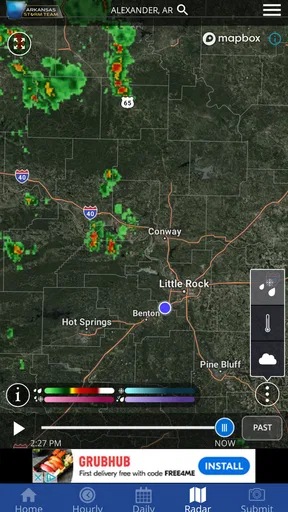
- Live radar helps track storms as they develop nearby.
- Severe weather alerts can provide valuable advance warning.
- Hourly and extended forecasts are easy to check.
- Weather updates are tailored to local communities across Arkansas.
Limitations of Arkansas Storm Team
- Some advanced radar features may require a stable internet connection.
- Frequent alerts can feel excessive during active weather periods.
- Forecast accuracy may vary for rural or remote locations.
- The app may use noticeable battery while tracking location and alerts.
- Certain features or content may depend on your selected location.
Other Releases by Nexstar Inc.
View All
WIVB News 4
News & Magazines3.7

WGN-TV
News & Magazines3.3

KTLA 5 News Los Angeles
News & Magazines3.1

NewsNation
News & Magazines3.3
Similar Picks in This Category
View All
Weather - By Xiaomi
Xiaomi Inc.4.1

Weather & Radar Forecast
WetterOnline4.8

Weather
OneLouder Apps4.6

AccuWeather: Weather Radar
AccuWeather3.6

The Weather Channel - Radar
The Weather Channel4.6

1Weather Forecasts & Radar
OneLouder Apps4.3
Frequently Asked Questions
What is the Arkansas Storm Team app used for?
The Arkansas Storm Team app provides weather information focused on Arkansas and nearby areas. It typically includes current conditions, hourly and extended forecasts, radar imagery, weather alerts, and video updates from the local meteorological team. It is designed to help users follow changing conditions, plan daily activities, and stay informed during severe weather events such as thunderstorms, tornadoes, flooding, and winter storms.
Does Arkansas Storm Team provide severe weather alerts?
Yes, the app is intended to keep users informed about important weather developments and may send notifications for severe weather warnings, watches, and other urgent conditions. Availability and timing can depend on your location settings, notification permissions, and the app’s current alert coverage. For the best results, allow notifications, enable location access when requested, and never rely on the app alone during life-threatening emergencies.
Does the app include radar and live weather coverage?
Arkansas Storm Team generally offers weather radar and local coverage to help users monitor precipitation and developing storms. Depending on the version and available services, you may also find forecast videos, storm-tracking information, maps, and updates from meteorologists. Radar data can sometimes be delayed or affected by network conditions, so users should compare it with official emergency communications when severe weather is approaching.
Is Arkansas Storm Team free to download and use?
The Arkansas Storm Team app is generally available as a free download for compatible Android and iOS devices. Some features may require an internet or mobile-data connection, and normal carrier data charges can apply when streaming videos, loading radar maps, or receiving updates. Before installing, check the official Google Play Store or Apple App Store listing for current availability, device requirements, privacy details, and any optional in-app features.
What permissions does Arkansas Storm Team require?
The app may request permissions for notifications, location, and network access. Location permission can help deliver forecasts and alerts relevant to your area, while notifications are important for receiving severe weather updates. You can manage these permissions in your device settings, although restricting them may reduce the app’s usefulness. Review the privacy policy before installation if you want more information about how location and usage data are handled.
